Quick answer
Official prices below were checked November 25, 2026. On the same day we walked through a free Individual account in our editor’s name, Ryan Tan; that test is in the section below.
Individuals — $0
One user, unlimited links and calendars, payments, workflows, and webhooks. Enough for most freelancers and consultants.
Teams — $12/user/mo (yearly)
$16 billed monthly. Round-robin, collective and recurring events, routing forms, insights, branding removal. 14-day trial.
Organizations — $28/user/mo (yearly)
$37 billed monthly. Sub-teams, SSO and SCIM, SOC 2 and ISO 27001, your own subdomain, US or EU data hosting.
New users who sign up through our link get 20% off for 12 months, per Cal.com’s current referral terms. Confirm the offer when you subscribe. We may earn a commission if you do.
Cal.com plans and prices
| Plan | Billed yearly | Billed monthly | Adds |
|---|---|---|---|
| Individuals | $0 | $0 | 1 user; unlimited links and calendars; email and SMS notifications; Stripe and PayPal; workflows; webhooks; Calendly import |
| Teams | $12 per user / month | $16 per user / month | Round-robin, collective, recurring events; branding removal; routing forms; insights; same-day support |
| Organizations | $28 per user / month | $37 per user / month | Sub-teams; SSO and SCIM; SOC 2 / ISO 27001; subdomain; US or EU hosting |
| Enterprise | Custom | Custom | SLA; dedicated database; Active Directory |
Source: Cal.com pricing, checked November 25, 2026. The in-app plans page we opened from a free Individual account the same day showed the same yearly and monthly figures, with an annual toggle labeled “-25%.”
Our arithmetic: yearly billing saves $4 per user per month on Teams (25%) and $9 on Organizations (about 24%) compared with monthly billing.
What the free plan includes (and doesn’t)
The Individuals plan covers what Calendly charges for on Standard: unlimited event types, multiple calendars, payments, and workflows. What you don’t get for free: anything with more than one host (round-robin, collective events), routing forms, removing Cal.com branding, and same-day support. If you’re weighing free tools, see the best free Calendly alternatives.
We tested Cal.com’s free plan on 25 November 2026
We walked through Cal.com’s free Individual plan on 25 November 2026, on an existing account in our editor’s name, Ryan Tan (username schedulecompared). This is a same-day look at event types (the sidebar calls them “Links”), the 30-minute event editor, workflows, the public booking page, and the in-app plans page. It is not a long-term usage test. We did not save a workflow, and we did not complete a paid booking.
The sidebar labeled event types as “Links” (/links). The account had default events for 15 minutes and 30 minutes, plus a hidden “Secret meeting.” Each event had a “Publish on Discover” button. The Home screen included an “Ask Cal.ai” chat assistant.
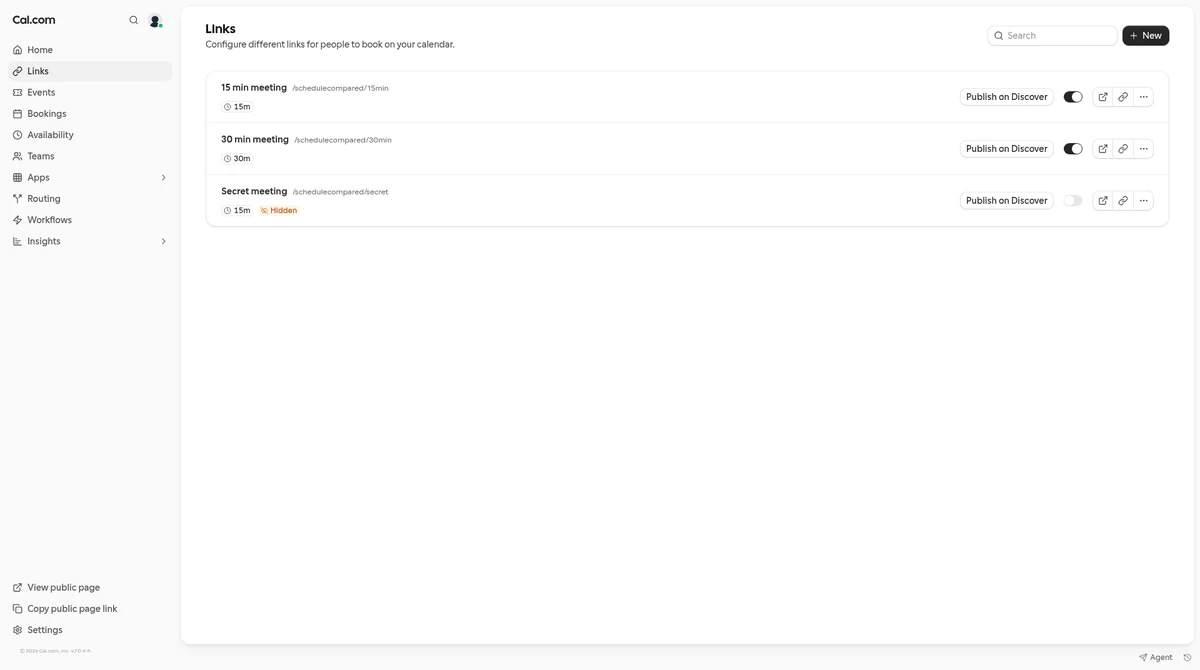
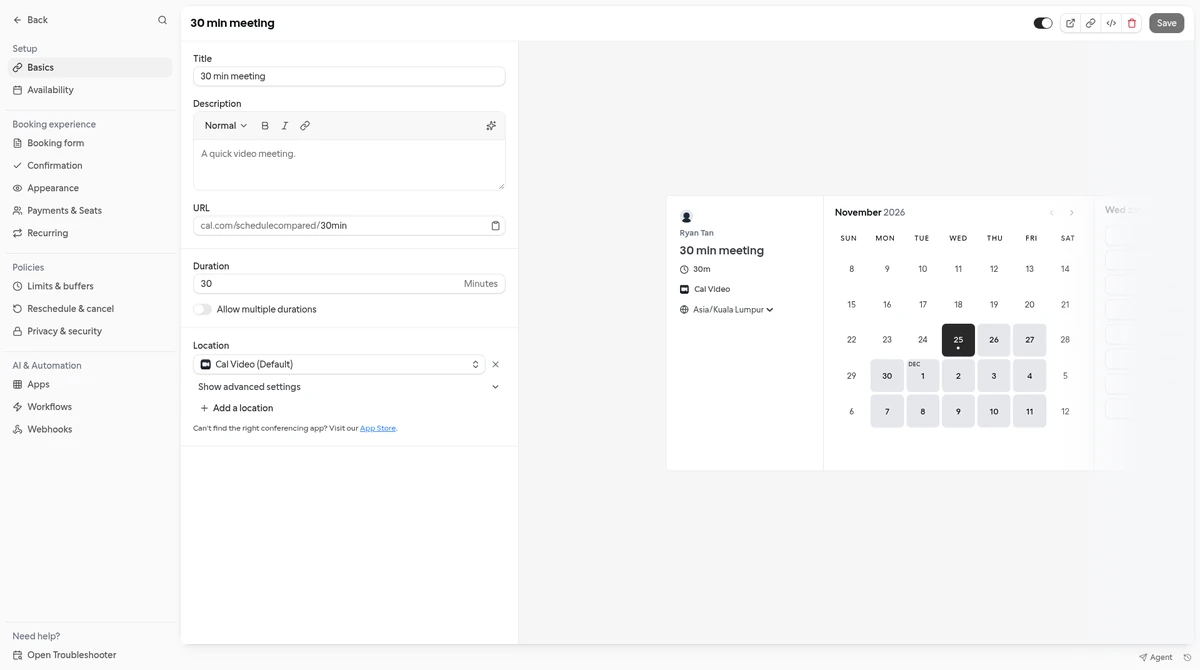
The 30-minute event editor was organized into Setup (Basics, Availability); Booking experience (Booking form, Confirmation, Appearance, Payments & Seats, Recurring); Policies (Limits & buffers, Reschedule & cancel, Privacy & security); and AI & Automation (Apps, Workflows, Webhooks). Defaults were 30 minutes, location Cal Video, Monday–Friday 9:00 a.m. to 5:00 p.m., a minimum notice of 2 hours, and no buffers. There was an “Optimized slots” toggle.
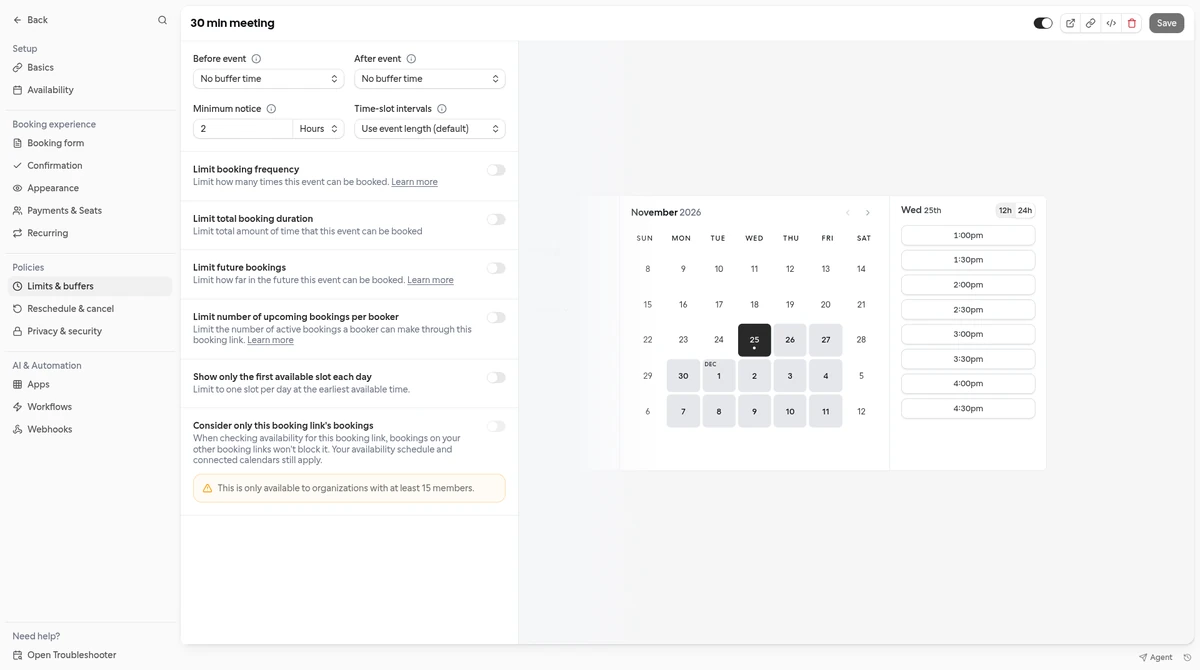
On Limits & buffers, these controls were available (unlocked) on the free plan: booking frequency limits, total duration limits, future booking limits, per-booker upcoming limits, and first-slot-only. One control was locked: “Consider only this booking link’s bookings,” with a notice that it is only available to organizations with at least 15 members.
Privacy & security showed eight toggles — private notes, calendar invites, requires confirmation, booker email verification, hide notes, hide event details, private links, and hide organizer email — and they were not locked. Payments & Seats showed “Paid booking” and “Offer seats.” We did not test whether a payment app has to be connected before those options work. Availability allowed more than one schedule (a “New” button) and an out-of-office redirect.
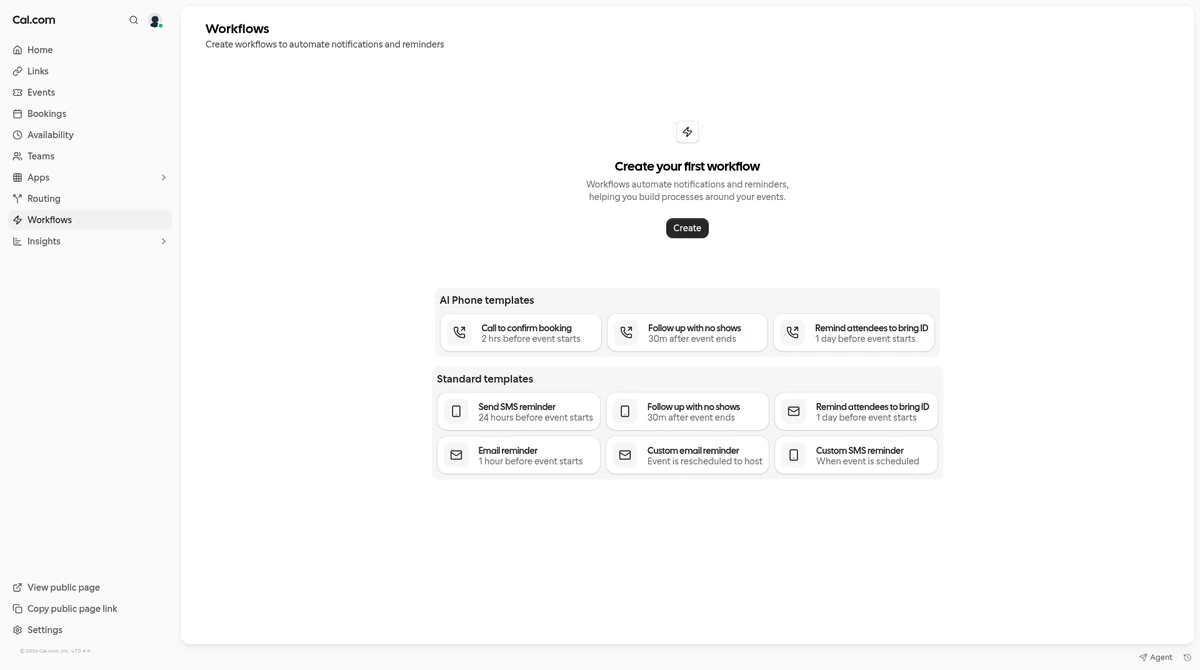
The Workflows page was not locked. Templates included an email reminder, an SMS reminder, a no-show follow-up, and AI phone calls. SMS and AI features use credits (1 credit = 1 cent USD; our balance was 0). We did not save a workflow. The app store was also open on the free plan; the categories we noted included Conferencing (24), Automation (23), Analytics (12), and Calendar (9).
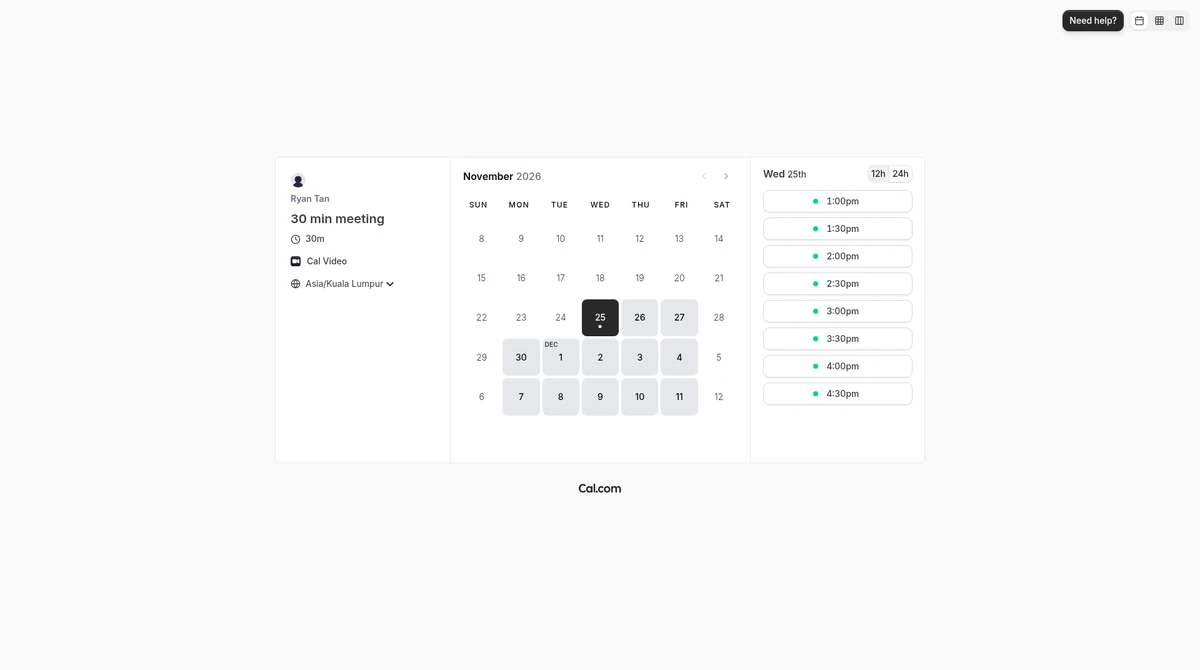
The public booking page at cal.com/schedulecompared/30min showed bookable time slots, a 12-hour/24-hour toggle, a timezone picker, and month, week, and column views. It also showed the Cal.com logo; branding stays on the free plan.
Opening Teams, Routing forms, and Insights showed a paywall: “Available on Teams, Orgs.”
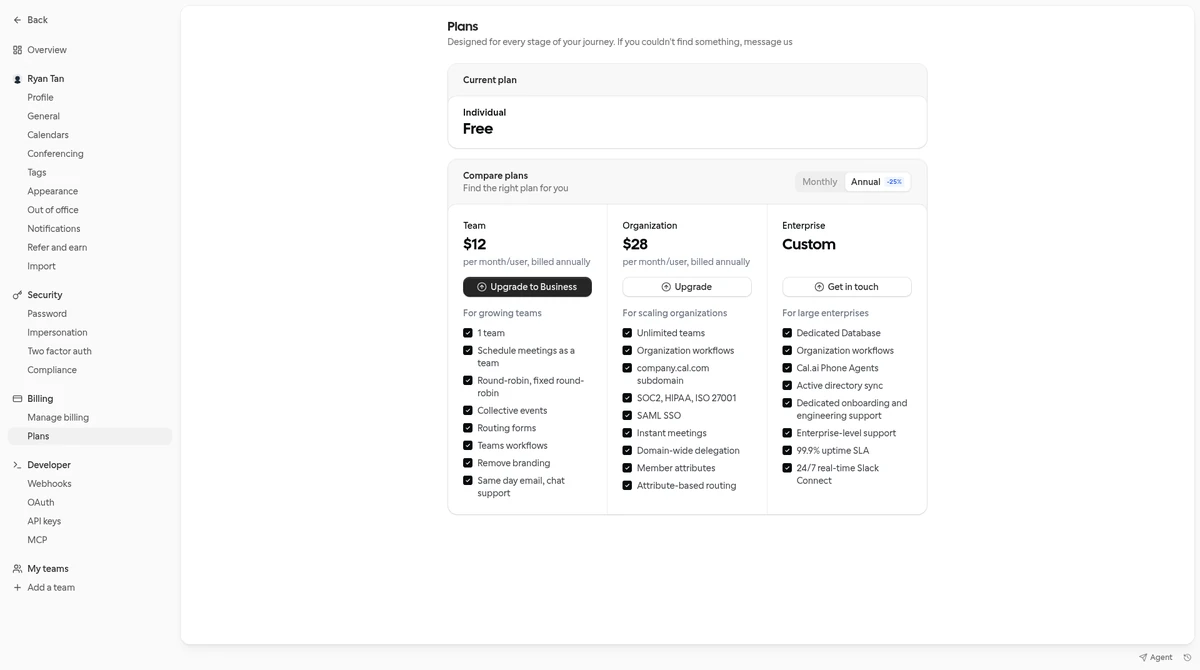
The in-app plans page, as shown on 25 November 2026, listed Individual as Free (our current plan). Team was $12 per user per month billed annually, or $16 billed monthly, described as including round-robin, collective events, routing forms, team workflows, and branding removal. Organization was $28 billed annually, or $37 billed monthly. Enterprise was custom. An annual toggle was labeled “-25%.” Those figures match the official prices in the table above.
What the free plan includes — and what is locked
What we could use on Free
- Multiple event types (“Links”), including 15-minute and 30-minute meetings and a hidden “Secret meeting”
- The 30-minute editor sections listed above, with Cal Video, weekday 9–5 hours, and a 2-hour minimum notice
- Limits and buffers, except the organization-only control
- Privacy and security toggles, which were not locked
- “Paid booking” and “Offer seats” were present (we did not test whether a payment app is required)
- Multiple availability schedules and an out-of-office redirect
- The Workflows page and templates (we did not save a workflow)
- The app store
- A public booking page with visible slots, timezone and view toggles
What was locked or listed as paid
- “Consider only this booking link’s bookings” (organizations with at least 15 members)
- Teams, Routing forms, and Insights (“Available on Teams, Orgs”)
- Round-robin, collective events, routing forms, team workflows, and removing branding (listed on Team)
- The Cal.com logo remains on the free public booking page
- SMS and AI phone features use credits (1 credit = 1¢ USD; our balance was 0)
These lists come from our 25 November 2026 walkthrough of a free Individual account and the in-app plans page we saw that day. Confirm current limits on Cal.com’s official pricing page before you subscribe.
Worked examples
Our arithmetic from official prices; taxes and payment-processor fees excluded.
| Scenario | Plan | Per month | Per year |
|---|---|---|---|
| Solo consultant | Individuals | $0 | $0 |
| 5-person sales team, yearly | Teams | 5 × $12 = $60 | $720 |
| 5-person team, monthly | Teams | 5 × $16 = $80 | $960 |
| 20 users needing SSO, yearly | Organizations | 20 × $28 = $560 | $6,720 |
| 3-clinician practice needing a BAA, yearly | Teams + BAA add-on | 3 × $12 + $300 = $336 | $4,032 |
How that compares with Calendly per seat: Calendly and Cal.com cost, or run your own numbers in the pricing calculator.
HIPAA and BAA pricing
Cal.com’s HIPAA page says the BAA is included on Enterprise and on Organizations with 15 or more users, and is a $300-per-month add-on for Teams or smaller Organizations. Cal.com’s pricing table shows HIPAA as available on Teams — that is through the add-on, not included in the $12 price.
Flagged: we read the pricing table’s Teams HIPAA “Yes” together with the HIPAA page; confirm the add-on with Cal.com sales before signing. For small practices, a BAA is cheaper elsewhere — see Is Calendly HIPAA compliant? and HIPAA-compliant scheduling software.
Cal.com pricing compared with rivals
| Tool | Free plan | Team plan (billed yearly) |
|---|---|---|
| Cal.com | 1 user, unlimited links | $12 per user |
| Calendly | 1 event type | Teams $16 per seat |
| SavvyCal | Links can’t take bookings | Basic $10 per user (includes round-robin) |
| Zoom Scheduler | 1 booking page | $4.99 per user |
Sources: Calendly, SavvyCal, Zoom Scheduler, checked November 25, 2026.
Head-to-heads: Cal.com vs Calendly, SavvyCal vs Cal.com, and Calendly alternatives for Outlook.
Frequently asked questions
Is Cal.com free?
Yes, for one user. Cal.com’s official Individuals plan is free and lists unlimited links and calendar connections, email and SMS notifications, Stripe and PayPal payments, Calendly import, workflows, and webhooks. Team features start on the paid Teams plan. In our 25 November 2026 walkthrough of a free Individual account, we could use multiple links, open workflows and the app store, and see bookable slots on a public page. Teams, Routing forms, and Insights were paywalled, and the Cal.com logo stayed on the booking page.
How much is Cal.com per user?
On Cal.com’s official pricing page checked November 25, 2026: Teams is $12 per user per month billed yearly or $16 billed monthly; Organizations is $28 per user per month billed yearly or $37 monthly; Enterprise is custom-priced.
Does Cal.com have a free trial?
Cal.com’s pricing page lists a 14-day trial on the Teams plan. The Individuals plan is free without a trial period.
How much does a Cal.com BAA cost?
Cal.com’s HIPAA page says a BAA is included on Enterprise and on Organizations with 15 or more users. For Teams or Organizations with fewer than 15 users, it is a $300-per-month add-on.
Free download
The scheduling software buyer’s checklist
A one-page, printable checklist (PDF) for comparing booking tools before you pay: the pricing model, free-plan limits, payments and fees, HIPAA and BAA questions, calendar sync, and the hidden costs that change the total. No vendor sponsorship.
Prefer to read it now? Open the checklist page.
Keep reading
2026 Scheduling Software Pricing Report
2026 scheduling software pricing report: official prices for 11 booking tools, free-plan limits, and list-price costs for 1, 5, and 10 users, with sources.
Calendly Pricing (2026): Plans Explained
Calendly pricing in 2026, from official pages and a 25 November 2026 free-plan test: Free, Standard, Teams, Plus add-ons, and Enterprise limits.
Scheduling Software Pricing Calculator (2026)
Free scheduling software pricing calculator: enter team size, locations, and must-have features to compare monthly and yearly cost of 11 tools.
Scheduling Software Buyer’s Checklist (Free PDF)
Free scheduling software buyer’s checklist: 33 questions on pricing model, free-plan limits, payments, HIPAA BAAs, calendar sync, and hidden costs.