Which plan should you pick?
This page explains official Calendly pricing and plan docs, checked November 25, 2026. On 25 November 2026 we also signed up for a fresh free account and walked through it; that same-day test is in the section below. Calendly does not have an affiliate program with this site.
Standard at $10 per seat / month, billed yearly
Official help says Standard is for individuals or small teams who need unlimited event types, up to six calendars, payments via Stripe or PayPal, group and collective events, automations, and 24/7 live chat. You do not get round-robin or lead routing until Teams.
Teams at $16 per seat / month, billed yearly
Official pages add round-robin, lead routing from Calendly or marketing forms, Salesforce meeting sync, and admin controls. Volume discounts apply automatically on annual billing after 30 seats, per official help.
Calendly Free is narrow — compare Cal.com or Setmore
One event type and one calendar is a hard cap. If you need several meeting types at $0, see free Calendly alternatives and our Cal.com vs Calendly comparison.
Independent research, not a Calendly plan.
Official prices
The table below uses figures published on calendly.com/pricing and on Calendly’s Choose the right Calendly plan help article (updated September 1, 2026), both checked November 25, 2026. The public pricing page was showing yearly billing when we reviewed it. A monthly billing toggle exists on that page; we did not capture official monthly list prices from it, so they are omitted rather than guessed.
| Plan | Official price (yearly billing) | Published for |
|---|---|---|
| Free | $0 | One person, one event type, one calendar |
| Standard | $10 per seat per month | Unlimited event types, payments, automations |
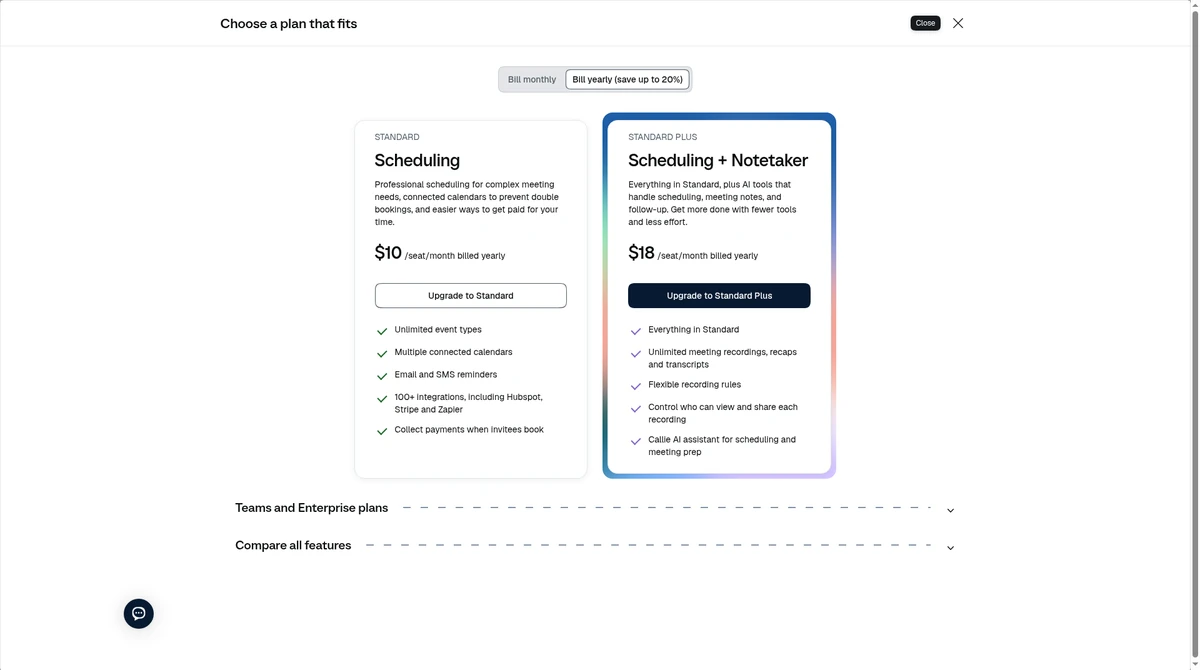
| Standard Plus | $18 per seat per month (in-app upgrade page, 25 November 2026) | Standard features plus Notetaker and Callie |
| Teams | $16 per seat per month for the first 30 seats | Round-robin, lead routing, admin controls |
| Teams Plus | $24 per seat per month for the first 30 seats | Teams features plus Notetaker and Callie |
| Enterprise | Starts at $15,000 per year | From 50 seats, USD only; SSO, audit log, dedicated support |
Standard and Teams prices are from the official pricing page. The Standard Plus $18 figure is from the in-app upgrade page we opened from a free account on 25 November 2026; we had not captured a labeled Standard Plus price on the public yearly pricing view. Teams volume tiers and the Teams Plus $24 figure are from official help, updated September 1, 2026. Always confirm the current number on Calendly’s site before you subscribe.
Free plan
Official pricing and help pages describe the Free plan as a basic individual tool. You can create one event type, connect one calendar, run unlimited one-on-one meetings, customize a booking page, send confirmation emails, embed the calendar on a website, and use the mobile app and browser extension.
That is enough if you only ever offer one kind of meeting — for example, a single 30-minute intro call. It is not enough if you also want a 15-minute phone slot, a paid session, or a second calendar checked for conflicts. Those limits are why many people search for Calendly alternatives before they pay.
We tested Calendly’s free plan on 25 November 2026
We signed up for a fresh Calendly free account on 25 November 2026, under our editor’s name, Ryan Tan. This is a same-day walkthrough of signup, the default event type, availability, automations, and the in-app upgrade page. It is not a long-term usage test.
Signup asked for an email address, a full name, and a password of at least 12 characters. There was no credit card, no phone number, and no captcha. Calendly required an email confirmation link before onboarding started.
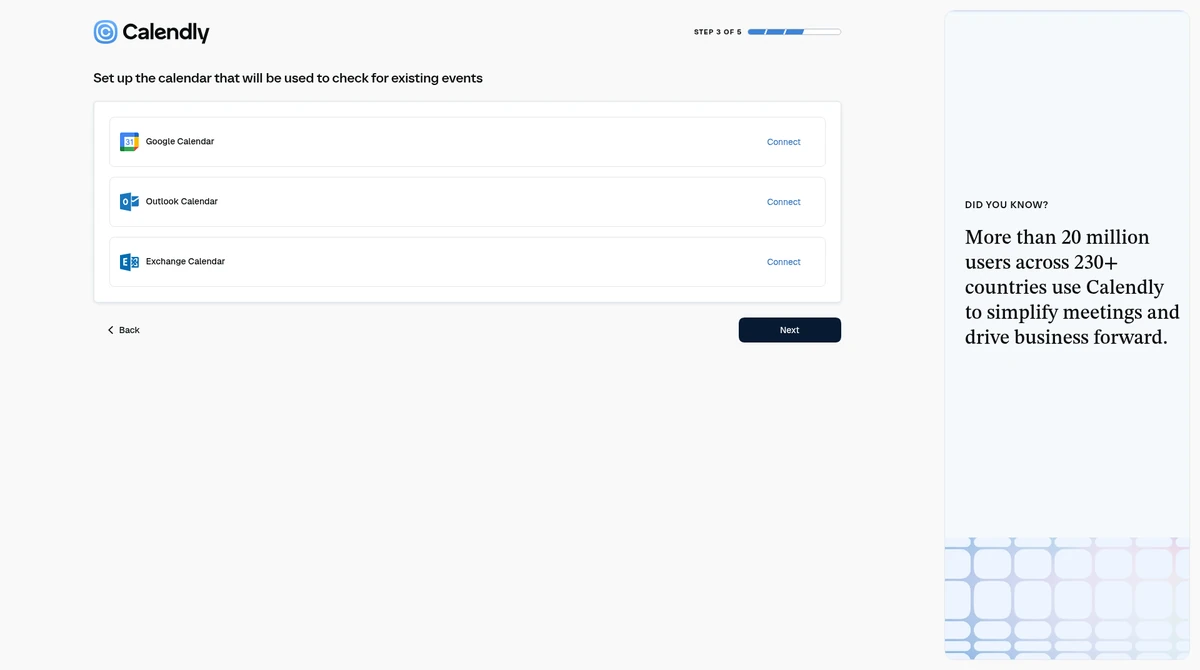
Onboarding had five steps: how we planned to use Calendly (“On my own” / “Schedule meetings”), a role question, calendar connection, availability, and Notetaker plus location. The calendar step offered Google Calendar, Outlook Calendar, and Exchange Calendar, and it could be skipped. Availability defaulted to weekdays, 9:00 a.m. to 5:00 p.m., with the timezone detected automatically — Malaysia Time on this account. On the last step, the Notetaker “join all meetings” toggle was on by default; we turned it off.
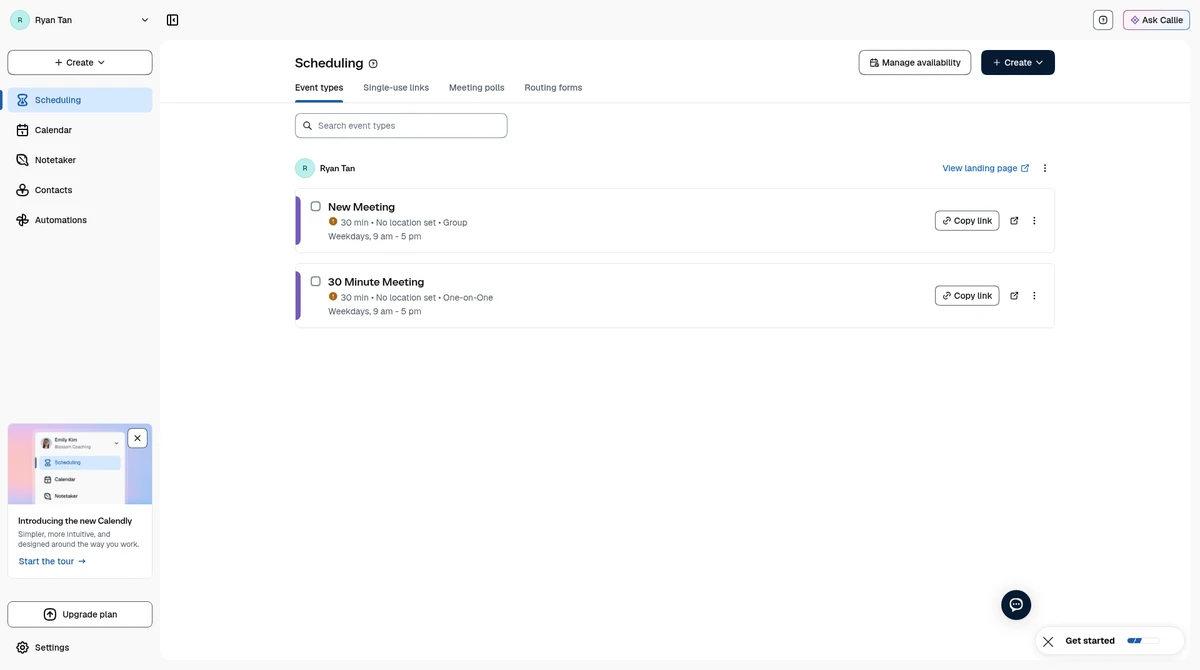
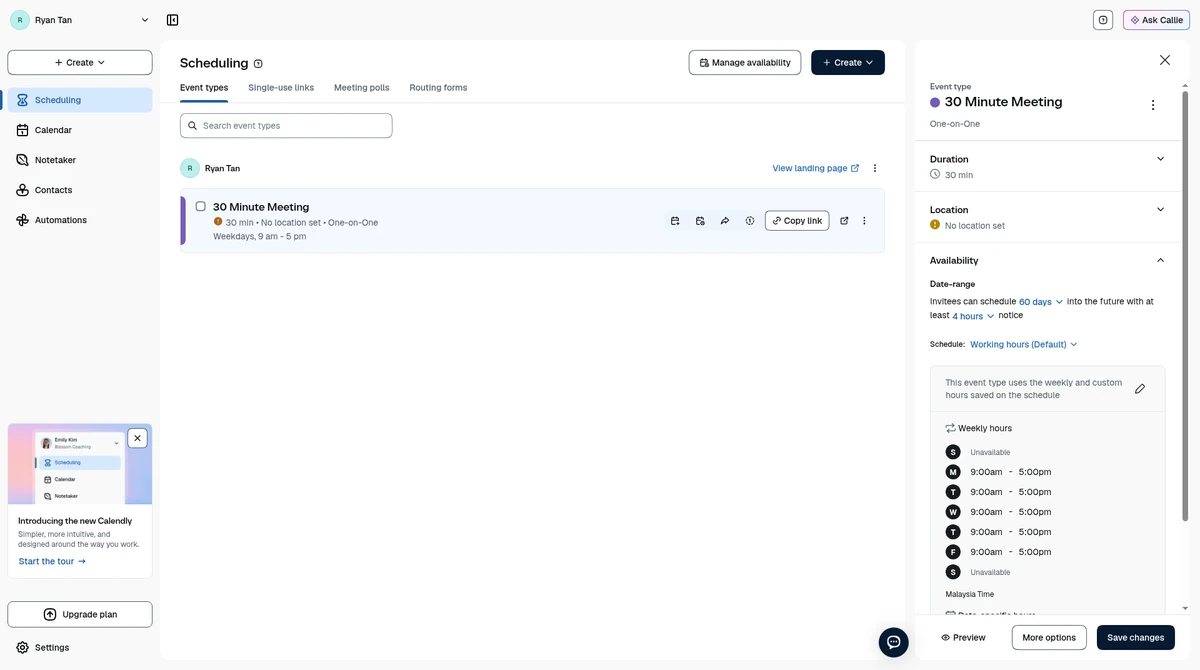
The account opened with a default event type named “30 Minute Meeting”: One-on-One, 30 minutes, no location, and working hours. Invitees could book up to 60 days ahead, with a minimum of 4 hours’ notice. The event editor included sections for Description, Limits and buffers, Free/busy rules, Booking page options (the public path /30min, 30-minute increments, and automatic timezone), an invitee form (name, email, and one question), Payment, Notifications and automations (email confirmations), and a Confirmation page.
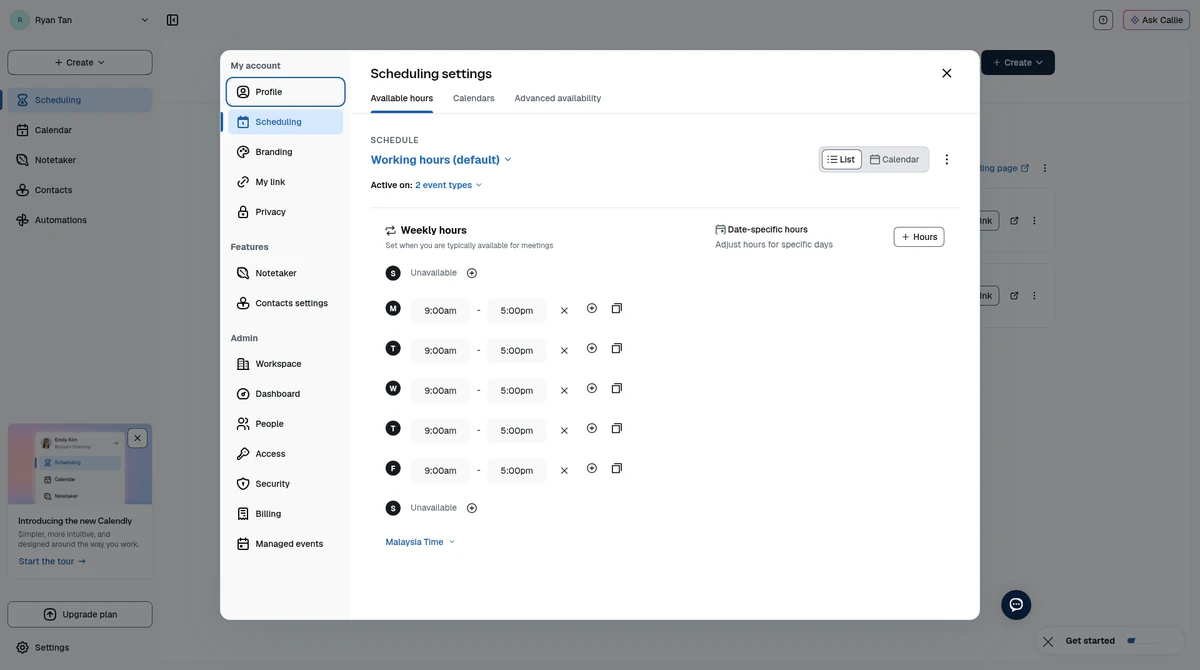
Availability settings included weekly hours, date-specific hours, meeting limits, and holidays.
Creating a Group event type was not blocked at creation. Calendly’s pricing table, however, listed free accounts as One-on-ones “Only 1,” with Group, Collective, and Round robin as paid features. We did not verify whether a group event can actually be booked on the free plan.
The Payment section required connecting Stripe or PayPal. The pricing table listed collecting payments as a Standard-only feature.
The public booking page showed a “Select a Date & Time” calendar, a timezone picker, and a “POWERED BY Calendly” ribbon. We captured that page while time slots were still loading, so we are not publishing that screenshot.
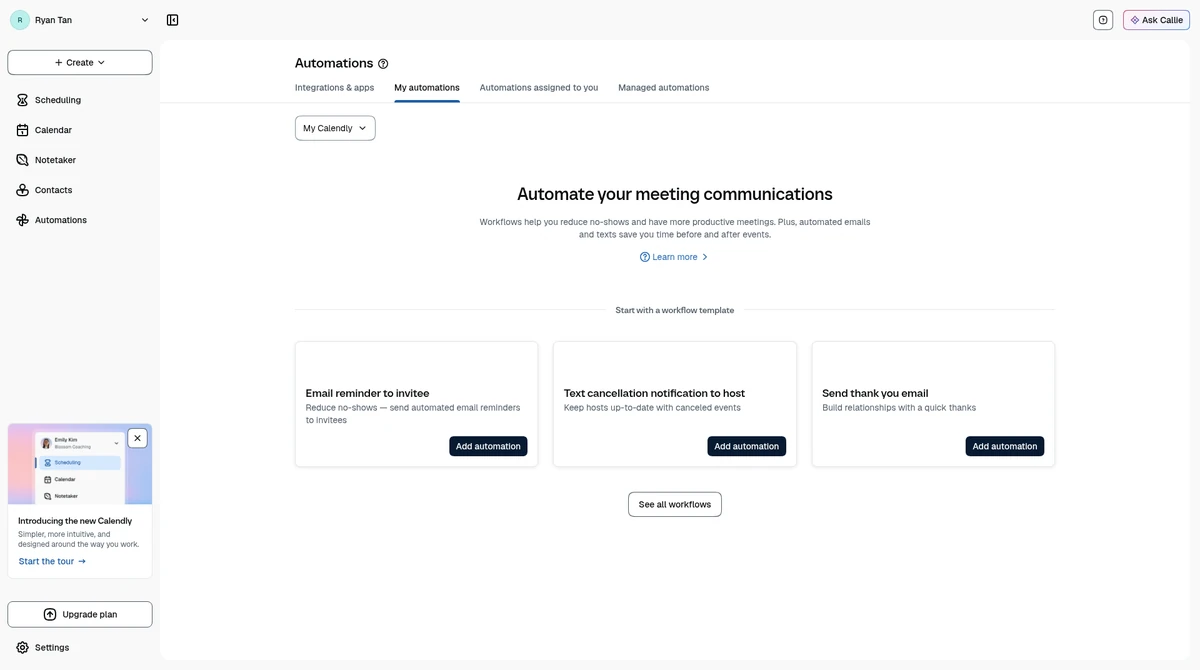
The Automations area showed workflow templates we could open from that screen. We also noticed that some /app/ URLs showed a blank page for several seconds before the interface rendered.
The in-app upgrade page, with yearly billing selected on 25 November 2026, showed Standard at $10 per seat per month billed yearly (unlimited event types, multiple calendars, email and SMS reminders, 100+ integrations, and payments); Standard Plus at $18 per seat per month billed yearly, labeled “Scheduling + Notetaker”; Teams at $16; Teams Plus at $24; and Enterprise starting at $15,000. The comparison table on that page listed these as paid: remove Calendly branding, custom branding, routing forms, analytics, multiple connected calendars, customized workflows, and SMS reminders.
What the free plan includes — and what is locked
What we could use on Free
- Signup with no credit card, phone number, or captcha (email confirmation was required)
- A default one-on-one “30 Minute Meeting”
- Availability settings: weekly hours, date-specific hours, meeting limits, and holidays
- A 60-day booking window and a 4-hour minimum notice on the default event
- Email confirmations, listed in the event editor
- A public booking page with a date-and-time calendar, a timezone picker, and a “POWERED BY Calendly” ribbon
- Optional calendar connection to Google, Outlook, or Exchange during onboarding
What the upgrade page listed as paid
- Collecting payments (Standard-only; connecting Stripe or PayPal was required)
- Group, Collective, and Round robin events (listed as paid, even though creating a Group event type was not blocked)
- Unlimited event types, multiple connected calendars, email and SMS reminders, and 100+ integrations (listed on Standard)
- Notetaker (listed on Standard Plus at $18 per seat per month, billed yearly)
- Removing Calendly branding, custom branding, routing forms, analytics, customized workflows, and SMS reminders
These lists come from our 25 November 2026 free-account walkthrough and the in-app upgrade page and comparison table we saw that day. Confirm current limits on Calendly’s official pricing page before you subscribe.
Standard and Standard Plus
Official help says Standard is best for individuals or small teams who need advanced scheduling but not team-level lead routing. With Standard you can:
- Create unlimited event types
- Connect up to six calendars to be checked for conflicts
- Use integrations such as HubSpot, PayPal, and Stripe
- Offer group (one host, many invitees) and collective (many hosts, one invitee) events
- Automate reminders and follow-ups
- Customize emails, the booking page, and the website embed
- Get 24/7 live chat support
The official pricing page also lists payments through Stripe and PayPal on Standard, including the ability to collect payment at booking. It additionally describes meeting packages, invoices, and custom payment terms in the feature comparison; we could not cleanly assign every one of those payment extras to a specific plan from the public page, so confirm them on Calendly’s pricing matrix if they are the reason you would upgrade.
Standard Plus is a distinct official plan. The help article says it includes all Standard features plus unlimited Notetaker access (automatic meeting recaps with decisions and action items), the Callie AI assistant (including adding callie@calendly.com to email threads), Ask Callie in Calendly, and searchable recaps. The public pricing page offers a toggle to add Notetaker and Callie to Standard. On the in-app upgrade page we opened from a free account on 25 November 2026, Standard Plus was listed at $18 per seat per month, billed yearly, under the label “Scheduling + Notetaker.” Confirm the current figure on Calendly’s site before you subscribe. The same help article publishes a clear Plus premium for Teams: $8 more per seat per month than Teams, billed annually.
Official pricing notes that Notetaker and Callie are only available in English at the time we checked.
Teams and Teams Plus
Official help describes Teams as the plan for round-robin distribution, lead routing, and admin controls. Published inclusions include Salesforce meeting sync, routing with Calendly, Marketo, Pardot, or HubSpot forms, HubSpot lookup for known leads, centrally managed event types, and 24/7 live chat. Single Sign-On is listed as an optional add-on on Teams, and as a built-in capability on Enterprise.
On annual subscriptions, Teams and Teams Plus use official tiered pricing: the first 30 seats stay at the list rate, and later seats are cheaper. These figures are from the help article updated September 1, 2026, for prices billed annually:
| Seat number | Teams (per seat / month, billed annually) | Teams Plus (per seat / month, billed annually) |
|---|---|---|
| 1–30 | $16.00 | $24.00 |
| 31–50 | $14.50 | $22.50 |
| 51–100 | $14.00 | $22.00 |
| 101–200 | $13.50 | $21.50 |
| 201–300 | $13.00 | $21.00 |
| 301+ | $12.00 | $20.00 |
Official help gives a worked example: on a 40-seat Teams plan, seats 1–30 cost $16 each per month and seats 31–40 cost $14.50 each per month, billed annually. Discounts apply automatically; you can add seats and view the total in Settings → Billing.
Teams Plus adds unlimited Notetaker access, Callie, shared team meeting recaps, and pre-drafted follow-ups, according to the same official article.
Enterprise
The official pricing page lists Enterprise from $15,000 per year, starting at 50 seats, available in USD only. Published capabilities include Salesforce lookup routing, Microsoft Dynamics, SSO and SAML, domain control, audit-log compliance, a data deletion API, onboarding and implementation, and dedicated account support. Official help also mentions SCIM, group provisioning, security and legal reviews, and the option to inquire about Notetaker and Callie.
How seats work
Official pricing copy says seats are required for users who connect calendars and host Calendly meetings. People who book time with you do not need a seat or an account. That is the usual per-host model, and it is why a five-person sales pod costs five seats even if each person only uses Calendly a few hours a week.
If you are comparing the annual Teams rate with tools that bill per account instead of per seat, include that difference in the math. Calendly vs Acuity Scheduling covers that contrast in more detail. For a tighter meeting-link comparison, see Calendly vs SavvyCal. For official annual rates multiplied by 1, 5, and 10 seats, see Calendly and Cal.com cost for 1–10 seats.
Cheaper or freer alternatives
Calendly is often the default, not always the cheapest. Official alternatives we have already compared include:
- Cal.com — a free Individuals plan with unlimited links and calendars for one user, and Teams at $12 per user per month billed yearly. Seat-count math is in Calendly and Cal.com cost.
- Setmore — a free plan for up to four users with unlimited appointments, and Pro at $5 per user per month billed annually.
- TidyCal — official Free, Lifetime, and Pro plans, with a 1% Stripe platform fee on Free.
- SavvyCal — Basic at $10 per user per month billed annually, but the free tier cannot accept bookings.
- SimplyBook.me and Acuity Scheduling — stronger fits when the job is salon-style appointments rather than meeting links. Also see Calendly vs Acuity.
For the wider field, start with our 2026 scheduling software guide or the Calendly alternatives roundup. Coaches, therapists, tutors, salons, personal trainers, and photographers have their own profession guides on this site.
View Cal.com View Setmore View SimplyBook.me
New users who sign up through our link get 20% off for 12 months, per Cal.com’s current referral terms. Confirm the offer when you subscribe. We may earn a commission if you do.
Want Calendly’s cost next to 10 other tools for your exact team size? Try the scheduling software pricing calculator or see the 2026 pricing report.
Related: Is Calendly HIPAA compliant?, Calendly vs Google Calendar, Calendly vs Microsoft Bookings, and Calendly vs Zoom Scheduler.
Frequently asked questions
How much does Calendly cost in 2026?
On Calendly’s official pricing page, checked November 25, 2026, with yearly billing selected, Standard is $10 per seat per month and Teams is $16 per seat per month. Enterprise starts at $15,000 per year with a 50-seat minimum and is available in USD only. There is also a Free plan. Official help, updated September 1, 2026, lists Standard Plus and Teams Plus as well. On the in-app upgrade page we opened from a free account the same day, Standard Plus was listed at $18 per seat per month, billed yearly. The public pricing page we reviewed was set to yearly billing; we did not capture official monthly list prices from that toggle.
What is included in Calendly’s free plan?
Official pages say the Free plan includes one event type, one calendar connection, one-on-one scheduling, a customizable booking page, the browser extension and mobile app, confirmation emails, a website embed, and unlimited meetings. Group and collective event types, multiple calendars, payments, automations, and team routing are not part of Free. In our 25 November 2026 free-account test, signup did not require a credit card, phone number, or captcha, and the account opened with a default 30-minute one-on-one event. Creating a Group event type was not blocked at creation, but we did not verify whether it can be booked; the pricing table still listed Group, Collective, and Round robin as paid.
How much is Calendly Teams Plus?
Calendly’s official plan-comparison help article, updated September 1, 2026, publishes annual Teams and Teams Plus tiered pricing. For the first 30 seats, Teams is $16 per seat per month and Teams Plus is $24 per seat per month, billed annually. Teams Plus is officially $8 more per seat per month than Teams at each volume tier. Confirm the figure on that help page or in your billing settings before you subscribe.
Does Calendly offer a HIPAA BAA?
Calendly’s public pricing and plan-comparison pages we checked do not list a Business Associate Agreement. If you need a vendor that officially offers a BAA, see our guide to scheduling software for therapists, which cites Acuity Premium, Setmore Health on Pro, SimplyBook.me Standard, and Cal.com Organizations or Enterprise.
Free download
The scheduling software buyer’s checklist
A one-page, printable checklist (PDF) for comparing booking tools before you pay: the pricing model, free-plan limits, payments and fees, HIPAA and BAA questions, calendar sync, and the hidden costs that change the total. No vendor sponsorship.
Prefer to read it now? Open the checklist page.
Keep reading
2026 Scheduling Software Pricing Report
2026 scheduling software pricing report: official prices for 11 booking tools, free-plan limits, and list-price costs for 1, 5, and 10 users, with sources.
Cal.com Pricing (2026): Every Plan Explained
Cal.com pricing for 2026, plus a 25 November 2026 free-plan test: Individuals at $0, Teams at $12, Organizations at $28, Enterprise, and BAA costs.
Scheduling Software Pricing Calculator (2026)
Free scheduling software pricing calculator: enter team size, locations, and must-have features to compare monthly and yearly cost of 11 tools.
Best Calendly Alternatives (2026)
Best Calendly alternatives in 2026, compared from official pricing pages: Cal.com, Setmore, TidyCal, SavvyCal, SimplyBook.me, Acuity, and built-in options.